


Building a Mini SOC with Node.js & Elasticsearch
I’ve been working on a hands-on project to simulate a basic Security Operations Center (SOC) environment using real log data.
In this project:
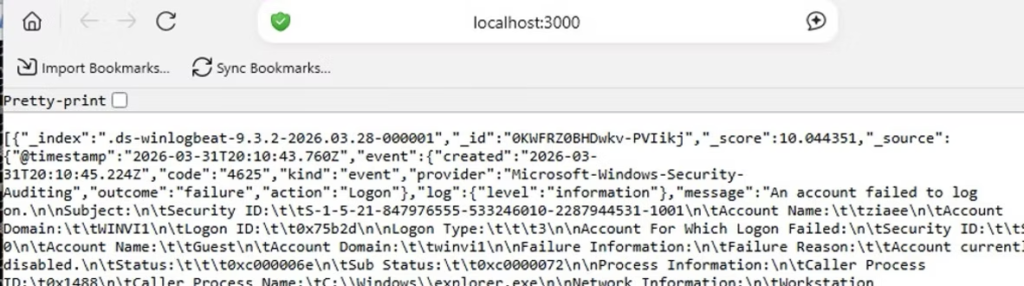
- Collected Windows security logs (Event ID 4625 – Failed Login)
- Queried data using Elasticsearch
- Built a backend API with Node.js & Express
- Implemented brute force detection logic based on repeated failed attempts per IP
The system automatically identifies suspicious activity when multiple failed login attempts are detected from the same source.
Example API endpoints:
- /api/logs/failed-login → Retrieve raw failed login events
- /api/detect/bruteforce → Detect potential brute force attacks
This project helped me better understand:
- Log analysis in real-world environments
- Detection engineering basics
- How SIEM-like systems work under the hood
Next steps:
- Build a real-time dashboard
- Add alerting (notifications/logging)
- Expand detection rules
1. Project Setup (in details)
- Create a project folder
- Initialize Node.js:
- npm init -y
Install dependencies:
npm install express @elastic/elasticsearch
2. Create the Server
Create a file:
server.js
Basic setup:
const express = require(‘express’);
const { Client } = require(‘@elastic/elasticsearch’);
const app = express();
const client = new Client({
node: ‘http://localhost:9200’,
auth: {
username: ‘elastic’,
password: ‘YOUR_PASSWORD’
}
});
3. API: Fetch Failed Login Logs
This endpoint retrieves failed login events (Windows Event ID 4625):
app.get(‘/api/logs/failed-login’, async (req, res) => {
try {
const result = await client.search({
index: ‘winlogbeat-*’,
size: 10,
query: {
match: {
“event.code”: “4625”
}
}
});
res.json(result.hits.hits);
} catch (err) {
console.error(err);
res.status(500).send(‘Error’);
}
});
4. API: Brute Force Detection
This endpoint detects suspicious activity based on repeated failed logins per IP:
app.get(‘/api/detect/bruteforce’, async (req, res) => {
try {
const result = await client.search({
index: ‘winlogbeat-*’,
size: 0,
query: {
match: {
“event.code”: “4625”
}
},
aggs: {
by_ip: {
terms: {
field: “source.ip”,
size: 10
}
}
}
});
const buckets = result.aggregations.by_ip.buckets;
const alerts = buckets
.filter(ip => ip.doc_count >= 5)
.map(ip => ({
ip: ip.key,
attempts: ip.doc_count,
alert: “Brute Force Detected”
}));
res.json(alerts);
} catch (err) {
console.error(err);
res.status(500).send(‘Error’);
}
});
app.get(‘/api/detect/bruteforce’, async (req, res) => {
try {
const result = await client.search({
index: ‘winlogbeat-*’,
size: 0,
query: {
match: {
“event.code”: “4625”
}
},
aggs: {
by_ip: {
terms: {
field: “source.ip”,
size: 10
}
}
}
});
const buckets = result.aggregations.by_ip.buckets;
const alerts = buckets
.filter(ip => ip.doc_count >= 5)
.map(ip => ({
ip: ip.key,
attempts: ip.doc_count,
alert: “Brute Force Detected”
}));
res.json(alerts);
} catch (err) {
console.error(err);
res.status(500).send(‘Error’);
}
});
5. Start the Server
Run the server:
node server.js
Server will start on:
6. Test the APIs
Get failed login logs:
http://localhost:3000/api/logs/failed-login
Detect brute force attacks:
http://localhost:3000/api/detect/bruteforce
What This Achieves
This setup provides:
- Real-time log retrieval from Elasticsearch
- Basic threat detection logic
- A foundation for building a SOC dashboard
RELATED POSTS
View all


Lab: Reflected XSS in a JavaScript URL with some characters blocked
July 1, 2025 | by ziaeework
Building Real-Time Telegram Alerts for a SOC Dashboard (Elastic Stack + Node.js)
April 10, 2026 | by ziaeework
Building a Mini SOC Dashboard from Scratch (Node.js + Nginx + Elasticsearch)
April 20, 2026 | by ziaeework